Mister Fast: A Textured Brush Font for Contemporary Web Design
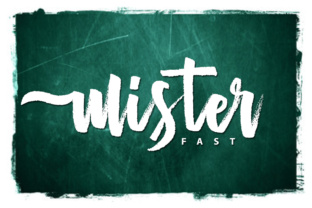
I was staring at a blank hero section on a new coaching website project, trying to balance professionalism with approachability. The layout was clean, the copy was strong, but it felt sterile. I needed something that breathed personality without sacrificing readability or modern aesthetics. That is when I decided to test Mister Fast. As a textured brush font that delivers a contemporary approach to design, it immediately caught my eye. It isn’t just another decorative script; it is a Script Handwritten typeface with an irregular baseline that feels organic yet intentional. In this article, I will walk you through how I integrated Mister Fast into a real digital product, what worked, what didn’t, and why this font might be the missing piece in your own web design toolkit.
Mister Fast for Hero Sections and Brand Headers
The first thing I noticed about Mister Fast is its ability to command attention in large-scale layouts. When I dropped it into the main headline of a landing page, the texture of the brush strokes added depth that flat vector fonts often lack. Because it is a handmade natural script, it carries a human touch that resonates with users scrolling through content. However, using a display font like this requires strategic placement. I found that Mister Fast excels as a hero title or a brand header where the user has time to absorb the visual weight. For subheadings or body text, it becomes too busy and competes with the message. By reserving Mister Fast for high-impact areas, I maintained a clear visual hierarchy. The irregular baseline adds a dynamic rhythm to the top of the page, guiding the eye downward toward the call-to-action buttons. This is not a font for paragraphs; it is a font for statements. If you are designing a portfolio homepage or a boutique online store, using Mister Fast for your primary logo or hero banner can instantly elevate the perceived value of the brand.
Mister Fast for Landing Pages and Campaign Graphics
As I moved down the page, I tested Mister Fast in various contexts to see how it performed under different constraints. One of the most effective uses was for campaign-specific graphics and promotional banners. The textured nature of the brush strokes works beautifully over solid backgrounds or even subtle gradients. I paired it with a simple sans serif font for the supporting details, creating a striking contrast between the expressive script and the neutral body copy. This combination ensures that while the headline grabs attention, the information remains scannable. For course creators and marketers, this pairing is invaluable. You want the excitement of the offer (conveyed by the script) balanced with the clarity of the terms (conveyed by the sans serif). I also experimented with using Mister Fast for short phrases within the body copy, such as pull quotes or emphasized keywords. When used sparingly, these accents break up long blocks of text and add visual interest without overwhelming the reader. Just remember that because it is a Script Handwritten style, legibility drops significantly at small sizes. Keep it large, keep it bold, and let it shine.
Mister Fast for Mobile Responsiveness and Readability
Testing typography on mobile devices is where many designers stumble, and Mister Fast presented some interesting challenges. On smaller screens, the intricate details of the brush texture can sometimes get lost or appear jagged if the resolution is low. To mitigate this, I adjusted the letter spacing slightly and ensured that the font size remained substantial enough to be readable. The irregular baseline of the font means that line height needs careful adjustment to prevent characters from colliding on narrow mobile views. I found that setting a comfortable line-height ratio helped maintain the airy feel of the script while keeping the text block cohesive. Furthermore, I tested Mister Fast against both light and dark backgrounds. On dark backgrounds, the white space within the brush strokes became more pronounced, which actually improved contrast and readability. On light backgrounds, I had to ensure the color was dark enough to provide sufficient contrast ratio for accessibility standards. For web designers building responsive sites, it is crucial to preview Mister Fast in all breakpoints. It works best when treated as a display element rather than a functional one, ensuring that the user experience remains smooth across desktops, tablets, and smartphones.
Mister Fast for Digital Brand Kits and Social Media Assets
Beyond the website itself, I explored how Mister Fast could extend into a broader digital brand kit. Consistency is key to building trust, and having a distinctive typeface helps anchor the brand identity across platforms. I used Mister Fast for social media graphics, email headers, and digital ad creatives. The handmade quality of the font gives these assets a personal, authentic feel that stands out in crowded feeds. Whether it is a thumbnail for a YouTube video or a banner for a Facebook campaign, Mister Fast adds a layer of sophistication that generic fonts cannot match. It is particularly effective for creative professionals, such as photographers, artists, and consultants, who want to convey creativity and individuality. When downloading Mister Fast, I checked the included styles and alternate characters to ensure versatility. Having access to multiple weights or variations allows for greater flexibility in design compositions. For example, using a lighter weight for secondary text can create a subtle nod to the main headline without repeating the exact same visual weight. This attention to detail enhances the overall polish of the brand, making it look more professional and established.
Mister Fast for E-commerce Banners and Product Showcases
In the realm of e-commerce, visual appeal drives engagement, and Mister Fast proved to be a powerful tool for product showcases. I applied it to sale banners, new arrival notifications, and featured product titles. The contemporary approach to design that this font offers aligns perfectly with modern shopping trends that favor authenticity and storytelling. When paired with high-quality product images, Mister Fast adds a narrative element to the shopping experience. It suggests that the products are curated with care and crafted with intention. However, caution is still required regarding button text and pricing information. These elements need to be instantly recognizable and easy to read. I reserved Mister Fast for the decorative aspects of the product cards, leaving the critical transactional data in a clean, legible sans serif font. This separation ensures that the aesthetic appeal does not interfere with the usability of the site. Users should be able to find what they need quickly, while the typography enhances the emotional connection to the brand. For online store owners looking to differentiate their shop from competitors, incorporating a unique Script Handwritten font like Mister Fast can be a simple yet effective way to boost brand recall.
Technical Considerations and Licensing for Web Use
Before implementing Mister Fast in any live project, there are practical technical steps every designer must take. First, verify the file formats available for download. For web use, converting the font to web-friendly formats like WOFF2 is essential for performance and compatibility. Check if the font includes ligatures or special characters that might enhance your design possibilities. Additionally, review the commercial font licensing agreement carefully. Ensure that your intended use—whether it is for a client project, a SaaS platform, or an online course—falls within the permitted scope. Misunderstanding license terms can lead to legal issues later on. Also, consider the load time impact. While modern browsers handle custom fonts well, embedding heavy font files can slow down page speed, which affects SEO and user retention. Optimize your font files and use preload tags to ensure they render correctly without causing layout shifts. By addressing these technical details upfront, you can leverage the full potential of Mister Fast without compromising the performance of your website. Ultimately, choosing the right Fonts is about balancing beauty with function, and Mister Fast offers a compelling blend of both for today’s digital landscape.